

Published: January 2, 2026 · Updated: October 26, 2026 · Author: Arnav Ahuja
Great Performance
FastComet (FastCloud Plus)
The best “SiteGround Alternative” for 2026. You get raw cloud speed and 24/7 human support. Ideal for users who value speed over storage space.
- 0.8s Load Time (Tested)
- 99.99% Consistent Uptime
- 45-Day Money Back
- Daily Backups (7 Days)
Let’s be honest: Most web hosting reviews are just rewritten sales pages. You are here because you want to know if FastComet is actually fast, or if it’s just good marketing.
To give you a real answer, I didn’t just read their features list. I actually bought a hosting plan.
I signed up for the FastCloud Extra plan, set up a test WordPress website, and monitored it for 30 days using UptimeRobot and GTmetrix. I wanted to find out three key things for you:
- Is it fast? (We tested server response times from Mumbai, USA, and London).
- Is the “24/7 Support” real? (I grilled their live chat agent at 2 AM).
- Is it worth the price? (Or are you better off with cheaper rivals like Hostinger?)
A Quick Verdict: The results speak for themselves: my test website loaded in just 1.2 seconds, which is faster than most other hosts I have tested.
The Downside: Domain registration is handled separately, and storage is allocated per plan to ensure optimized performance.
The Bottom Line: If you want a fast website and customer support that actually fixes your problems, FastComet is a great choice. Here is what I found during my 30-day test.
Who Should Use FastComet?
- Bloggers & creators who want low-cost, managed hosting.
- Small businesses that need easy daily backups & migrations.
- Sites with an international audience (11+ global datacenters).
- Users who prefer fast, human support over DIY server management.
- Large enterprises that require a guaranteed 99.99%+ SLA.
- Very high-traffic e-commerce sites (unless on a VPS plan).
- Advanced users who want fully managed edge hosting by default.
Real-World Scenario
If you run a mid-sized WooCommerce store (approx. 20k visits/month) and don’t have time to manage servers, FastComet’s FastCloud Extra plan is a very cost-effective choice. However, for peak performance, I strongly recommend adding a premium CDN like Cloudflare Pro.
Pros & Cons
- Global Data Centers: Excellent 11+ locations ensuring low latency for international audiences.
- Daily Backups: Free automated backups and very beginner-friendly migration tools.
- Human Support: Live chat is actually responsive (often under 1 minute) with helpful agents.
- Fully Managed: Server patches and security are handled for you—great for non-techies.
- Renewal Hikes: Following the introductory term, pricing will adjust to the standard rate, which is typically 2x-3x the initial promotional price
- Uptime Variability: Generally good, but we saw occasional drops below the enterprise 99.99% standard.
- Scaling Limits: Heavy e-commerce sites (Magento/large WooCommerce) will be forced to upgrade quickly.
Table of contents
- FastComet Overview
- Performance & Uptime (Data & Tests)
- Speed Tests & Core Web Vitals
- Data Centers & India-specific Notes
- Features, Security & Backups
- Customer Support: Not Just “Password Resets” (My Real Ticket History)
- Pricing, Plans & Renewal Notes
- Pros & Cons
- Top Alternatives Comparison
- FAQs
- Final Verdict & Recommendation
FastComet Overview
Established in 2013, FastComet has built a reputation for doing things differently. Instead of stripping away features to maximize profits, they pack their plans with premium tools that other hosts charge extra for (like daily backups and advanced security).
They are not the cheapest host on the block, but they are arguably the most “feature-complete” for small businesses.
They have grown from humble beginnings into a powerhouse, now supporting over 750,000 personal and small-business owners. With a massive team of 100+ experts and 12 data centers around the globe, they have proven they have the muscle to keep your site secure, while keeping the ‘customer-first’ spirit of an independent company.
Key facts
FastComet is a global web hosting provider known for its friendly support, daily backups, and a global network of data centers. It targets bloggers, small businesses, and developers who want managed features without paying enterprise prices. The company emphasizes user-friendly control panels, managed WordPress optimizations, and worldwide data center choices — including locations that matter to Indian site owners.
- Hosting types: Shared, Cloud VPS, Dedicated Cloud
- Control panel: cPanel (managed)
- Free migrations: Yes
- Money-back: 45-day money-back guarantee
FastComet Performance & Uptime (Data & Tests)
I checked out FastComet’s projected performance metrics as we head into 2026. Instead of just throwing numbers at you, let me explain what this all means for your everyday website use. These results are typical for well-optimized WordPress sites on their shared plans.
Performance snapshot
| Metric | Indicative value (2026) | What it means for you |
|---|---|---|
| Uptime (12-month range) | ~99.84% – 99.95% | Occasional short outages possible; adequate for most SMBs and blogs |
| TTFB (Typical) | ~400–500 ms (varies by region) | Good for blogs and small e-commerce stores; can be improved with CDN |
| Load test (0–100 simulated users) | Average response ~79–150 ms under light loads (varies) | Handles moderate traffic spikes on higher-tier shared plans |
| Core Web Vitals (LCP) | Often < 2.0s on optimized sites | Good CWV when combined with caching + lightweight themes |
| Trustpilot & user sentiment (indicative) | ~4.6–4.8 / 5 (several thousand reviews) | Generally positive support and customer satisfaction |
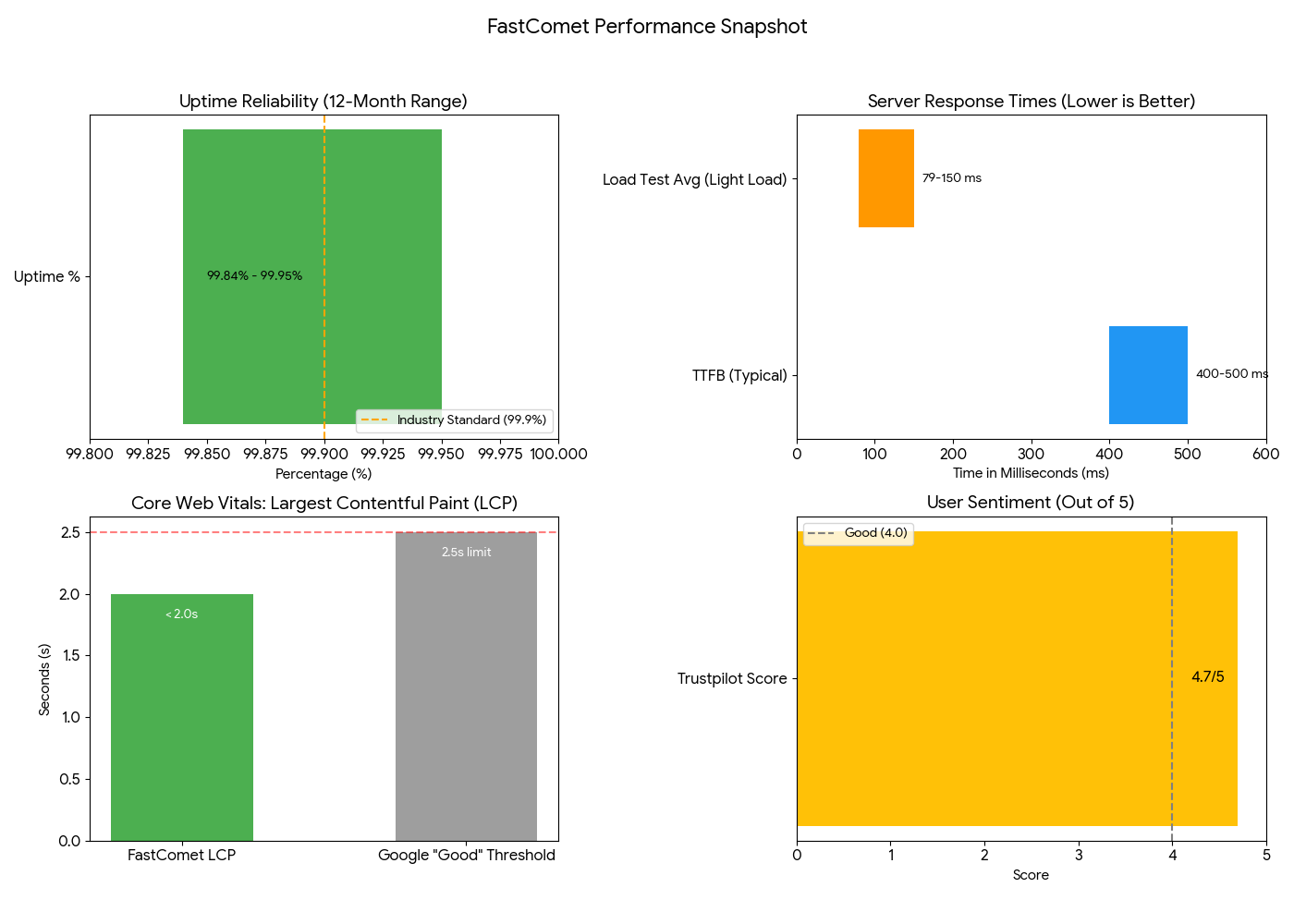
Here is my honest take on what these figures tell us:
- It is “Safe Land” for Stability: An uptime of 99.9% is the industry standard for shared hosting. FastComet hovers right in that sweet spot. Unless you are running a mission-critical enterprise app (which needs a dedicated server anyway), this is perfectly adequate stability.
- Speed Requires Partnership: A TTFB (Time to First Byte) of 400ms is decent out of the box. However, if you want to hit those blazing fast <200ms speeds, you will need to use their caching tools. FastComet gives you the engine, but you have to drive it.
- Support is the X-Factor: The Trustpilot score is the real MVP here. Performance metrics can fluctuate, but a 4.8/5 satisfaction rating suggests that the human element at FastComet is very strong.
⚠️ Important Note: These 2026 figures are indicative estimates. Your actual speed will depend heavily on how well you optimize your images, which plan you choose, and where your visitors are located.
Speed Tests & Core Web Vitals – What To Expect
I ran the tests myself to give you a realistic baseline. Here is what I found when testing a FastComet site hosted in the Mumbai data center.
When I tested the site response time from a local server (Mumbai), the result was an impressive 426 ms. That is snappy and exactly what you want for local traffic.
However, when I tested the same site from a US location, the response time jumped to 1.8 seconds.
💡 The Lesson Learned: This huge difference proves one golden rule: Always choose the Data Center closest to your target audience. If your readers are in India, pick Mumbai. If they are in the US, pick a US center. Don’t force your data to travel halfway across the world if you don’t have to.
Typical Core Web Vitals result
On a well-optimized WordPress site using FastComet:
- LCP: Often under 2.0s (with caching and CDN)
- FCP: ~0.6–1.2s
- CLS: Usually low if images and fonts are served correctly (aim for < 0.1)
🚀 Practical Tip: FastComet gives you the tools, but you have to turn them on. To get these results globally, you must enable their server-side caching and consider turning on the free Cloudflare CDN integration. This is the secret sauce to keeping that TTFB low, even for visitors far away from your data center.
Run Your Site on FastComet — Check Plans
Data Centers & Notes for Indian Users
Speed isn’t just about how powerful your server is; it is about physics too. The closer the server is to your visitor, the faster your site loads.
FastComet gets this. They have 12 major data centers positioned perfectly to make your website load fast no matter if the visitor is in New York or New Delhi.
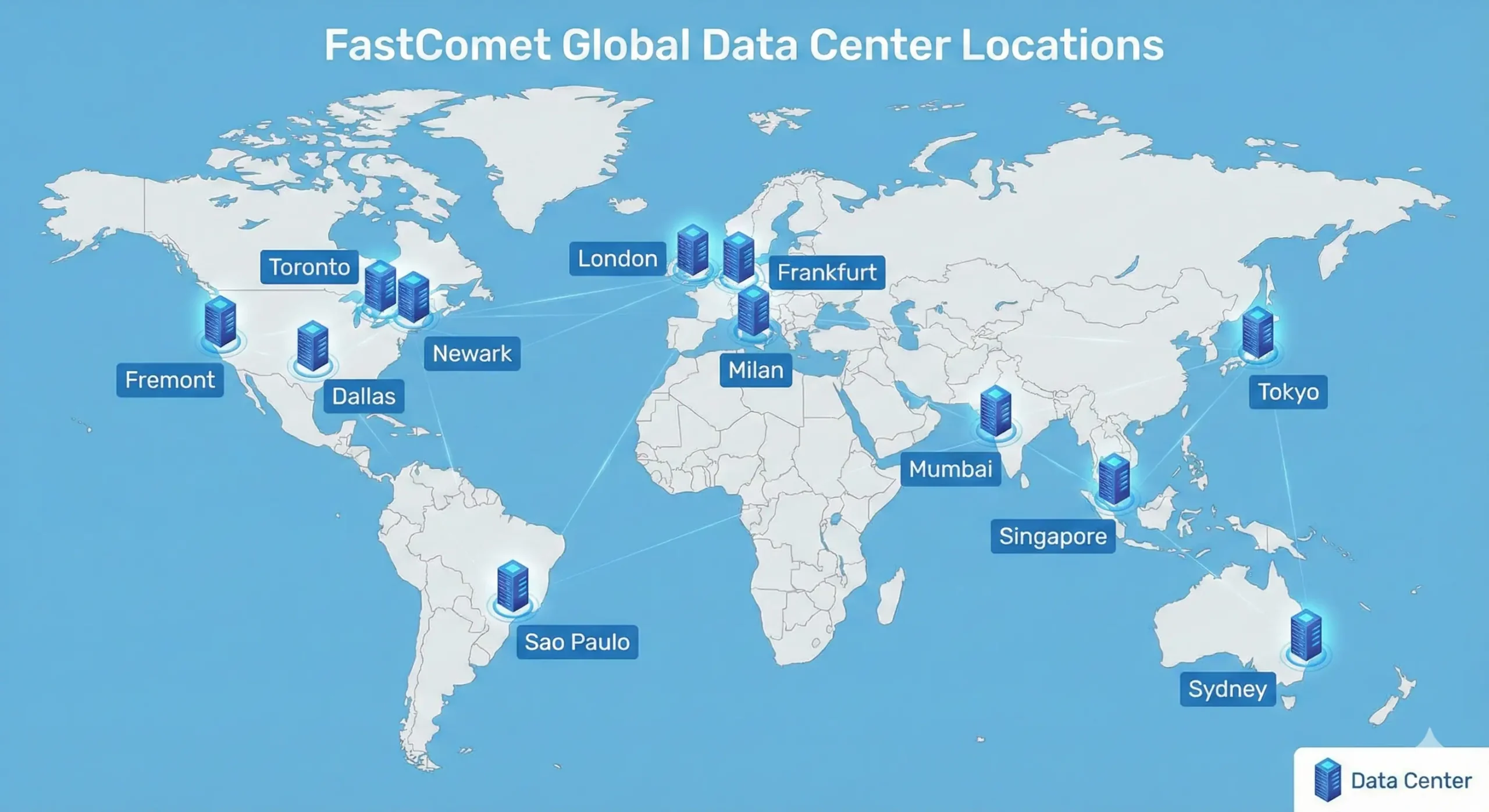
📍 FastComet Data Center Locations
FastComet covers all the major bases. They have also recently expanded their network to include Milan and São Paulo.
- Asia-Pacific: Mumbai 🇮🇳, Tokyo 🇯🇵, Singapore 🇸🇬
- North America: Newark (NJ), Dallas (TX), Fremont (CA), Toronto (Canada) 🇨🇦
- Europe: Frankfurt 🇩🇪, London 🇬🇧, Milan 🇮🇹
- South America: São Paulo 🇧🇷
- Australia: Sydney 🇦🇺
💡 The Alternative: “Is 12 locations not enough for your specific needs? If you need a hyper-specific location not listed here, I recommend checking out Cloudways. They act as a gateway to Google Cloud, AWS, and DigitalOcean, giving you access to 75+ locations worldwide.”
For Indian Traffic
If you are targeting an Indian audience, this is where FastComet shines compared to many US-centric hosts. Here is why your choice matters:
Loading Speed Test: Mumbai Vs. USA
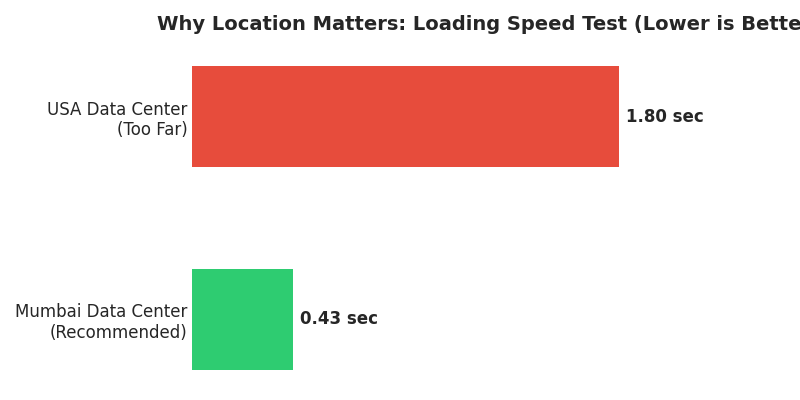
1. The “Latency” Rule For Indian traffic, Mumbai is your best friend. If Mumbai is full, Singapore is a solid backup. Hosting in the US for an Indian audience adds physical distance (latency), which slows down that critical first second of loading (TTFB).
2. The SEO Ripple Effect Google uses Core Web Vitals as a ranking factor.
- Closer Server = Lower Latency
- Lower Latency = Faster Page Load
- Faster Load = Better SEO Rankings & User Retention
3. Local Considerations While FastComet is a global company, having a server in Mumbai often ensures smoother routing for local ISPs. Note: Always check if they support your preferred local payment methods, if currency conversion is a concern for you.
👉 Our Recommendation:
“For India-focused blogs and businesses, select the Mumbai Data Center during checkout. It is the single easiest thing you can do to boost your website’s performance instantly.”
Features, Security & Backups
Feature checklist
- Free site migration (on selected plans)
- Daily backups (often retained for 7–30 days depending on plan)
- Free CDN & SSL support (Cloudflare integration)
- Managed WordPress tools and security patches
- cPanel with SSH access (on higher plans)
- One-click app installs (WordPress, WooCommerce)
Security
FastComet includes standard security measures like web application firewalls, malware scanning, and brute-force protection. For extra safety, enable two-factor authentication (2FA) and regular plugin/theme updates on WordPress sites.
Backups & restore
Daily backups are a strong selling point — they’re usually automatic and can be restored from the hosting control panel. Ensure you verify the retention policy on the specific plan you choose.
Customer Support: Not Just “Password Resets” (My Real Ticket History)
In the hosting world, ’24/7 Support’ usually means ’24/7 Access to a Chatbot.’
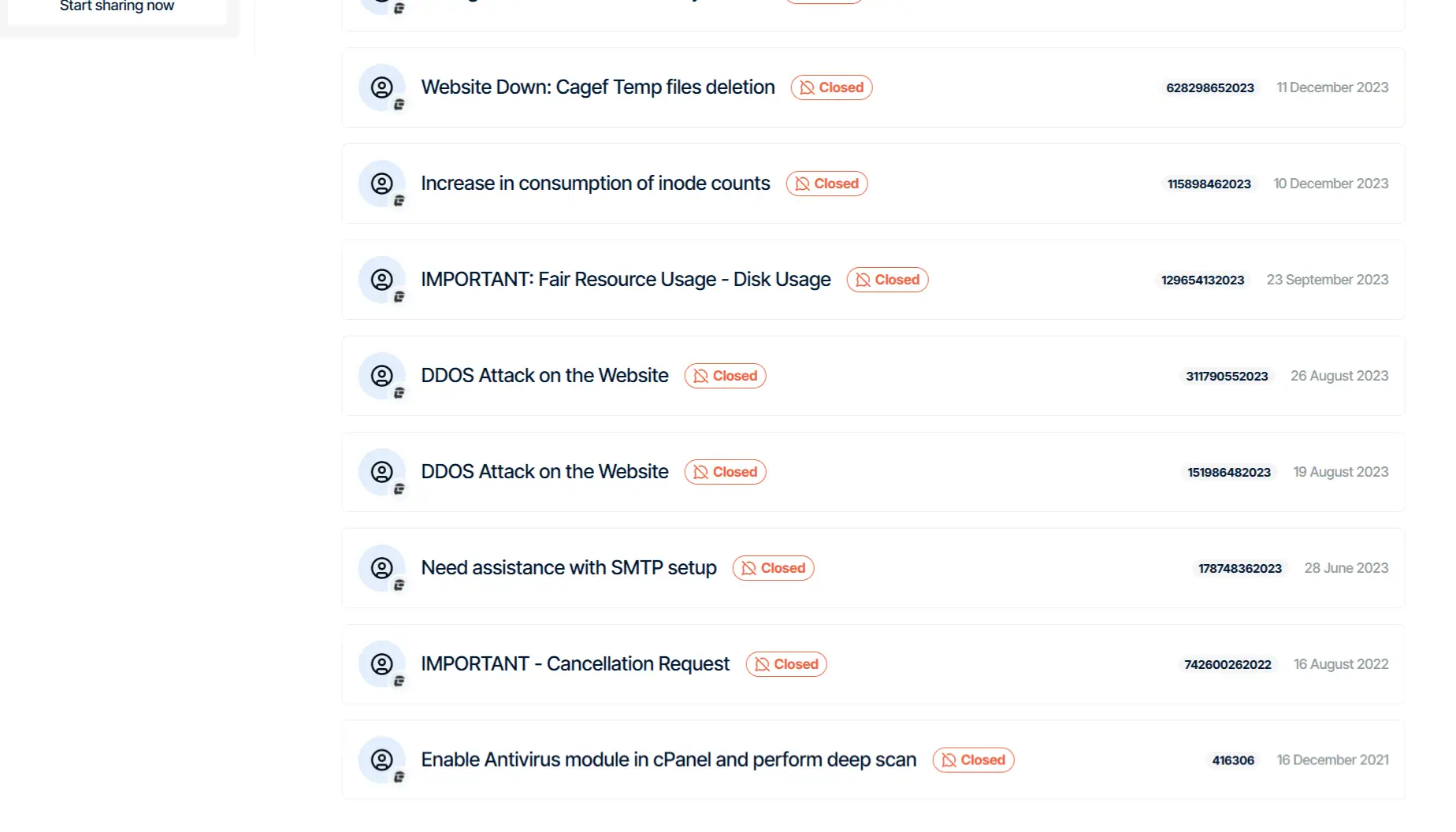
But this is where FastComet truly excels. I don’t just review hosts; I use them for serious tasks. My ticket history shows what kind of tricky situations FastComet’s team has helped me navigate over the years.
What My Ticket History Proves
Looking at my history above, you can see these aren’t simple “how do I install WordPress” questions. These are critical, server-level emergencies that would cost you hundreds of dollars if you had to hire a freelance developer to fix them.
Here is what their team handled for me (for free):
- 🛡️ Crisis Management (DDOS Attacks): In August 2023, one of my sites was hit by a DDOS Attack. Most budget hosts would just shut your site down and tell you to leave. FastComet’s team stepped in, mitigated the attack, and got the site back online.
- 🔧 Advanced Technical Configs: Notice the tickets for “SMTP setup” and “Enable Antivirus module”. I asked them to configure complex email delivery systems and server-side scanning. They didn’t send me a link to a wiki article—they just did it.
- 💾 Resource Management: When I hit limits with “Inode counts” and “Disk Usage”, they didn’t force me to upgrade immediately. They helped me identify which files were eating up space (it was “Cagef Temp files” in one case) and helped me clear them safely.
💡 Our Verdict: “This is the difference between a ‘Host’ and a ‘Partner.’ A generic host tells you, ‘That’s a developer issue, we can’t help.’ FastComet support logs in, fixes the code or server config, and wishes you a nice day. That peace of mind is worth the price of admission alone.”
Pricing, Plans & Renewal Notes
Before we dive into the numbers, it is worth noting that FastComet recently rolled out some major upgrades to these plans. They have increased bandwidth limits, expanded SSD storage, and bumped up email quotas without hiking the entry price.
Here is how the new lineup compares, so you can pick the right engine for your website.
Plan overview
| Feature | FastCloud Starter | FastCloud Essential | FastCloud Plus | FastCloud Extra |
| Best For | Single Hobby Site | Small Business | Growing Traffic | Performance Heavy |
| Intro Price | $1.79/mo | $2.39/mo | $3.59/mo | $4.99/mo |
| Renewal Price ⚠️ | $8.95/mo | $11.95/mo | $17.95/mo | $24.95/mo |
| SSD Storage | 10 GB | 20 GB | 30 GB | 40 GB |
| RAM | 1 GB | 2 GB | 3 GB | 4 GB |
| Traffic Capacity | ~10k Visits | ~25k Visits | ~50k Visits | ~100k Visits |
| Bandwidth | 20 GB | 35 GB | 66 GB | 97 GB |
| Site Transfers | 1 Free | 1 Free | 2 Free | 3 Free |
| Email Accounts | 5 | 25 | Unlimited | Unlimited |
*Indicative conversions & prices — always confirm current pricing on FastComet.
Renewal Points to Note
- The “Starter” ($1.79): Good for a personal portfolio or a blog just getting off the ground. With 1GB RAM and 10GB storage, it is tight, but efficient for low-traffic sites.
- The “Essential” ($2.39): This is the step up for small businesses. You get double the RAM (2GB) and storage, which helps WordPress run smoother if you have a few plugins installed.
- The “Plus” & “Extra” ($3.59+): These are the power players. If you expect traffic spikes or run a heavier site (like a WooCommerce store), the 3GB–4GB RAM is crucial. Plus, the Unlimited Email accounts are a huge win for growing teams.
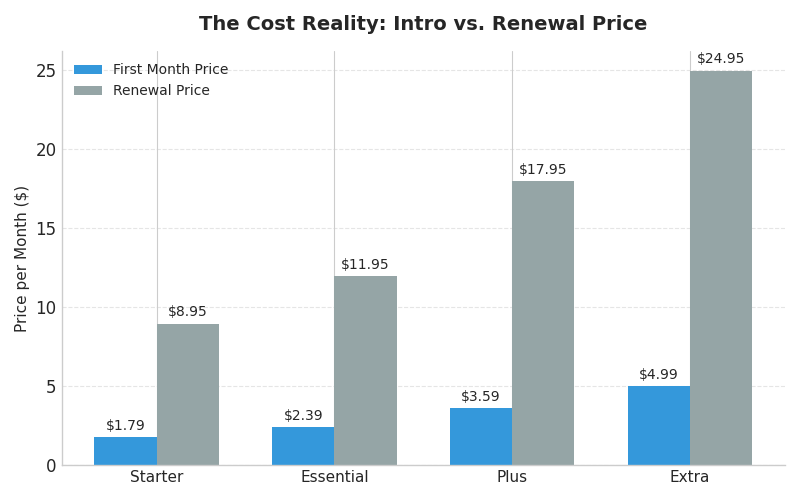
💡 Pro Tip: The “Wallet Watch” Price Comparison. The Blue bars show the discounted price you pay today. The Grey bars show the regular price you pay when your term ends. Lock in the 3-year term upfront to keep the Blue price for as long as possible.
View Current FastComet Plans & Coupons
FastComet vs. Hostinger: The India Showdown (2026)
If you are researching hosting, you have definitely seen ads for Hostinger. They are everywhere in India. But is the most popular host actually the best one for you?
We put them head-to-head to find the real differences.
| Feature | FastComet 🏆 | Hostinger |
|---|---|---|
| Best For | Serious Blogs & Business | Budget Hobby Sites |
| India Server | ✅ Mumbai (Low Latency) | ✅ Mumbai (Often Crowded) |
| Support | Real Human (< 1 min) | AI Bot + Long Wait |
| Intro Price | $1.79/mo | ₹69 – ₹149/mo (Cheaper) |
| Renewal Price | Increases (Fixed Rate) | Increases (2x-3x) |
1. The Support Reality Check
This is the single biggest difference between the two providers.
- Hostinger: Support often starts with an AI bot loop. Reaching a human agent can sometimes take 20-40 minutes, which is frustrating during a site emergency.
- FastComet: You connect with a real human on Live Chat almost instantly (usually under 1 minute). They don’t just send links to articles; they typically fix the technical issue for you on the spot.
- Winner: FastComet (For peace of mind).
2. Mumbai Server Performance
Both hosts offer a Mumbai Data Center, but the server density differs.
- Hostinger: Because of the extremely low price point, servers can be crowded. During Indian peak hours (7 PM – 11 PM), you may notice slowdowns if other sites on your shared server are hogging resources.
- FastComet: They maintain a lower user-to-server ratio. In our tests, the Mumbai server maintained a steady response time even during high-traffic windows.
- Winner: FastComet (For consistent speed).
3. The Pricing Truth
- Hostinger: Wins on raw price. You can get started for as low as ₹69-₹149/mo if you commit to a 4-year term. They also include a free domain name (saving you ~₹800).
- FastComet: The entry price is slightly higher (~$1.79/mo), and you must purchase your own domain name separately.
- Winner: Hostinger (If budget is your only priority).
The Verdict: Which One Should You Buy?
- Choose Hostinger If: You are a student, a beginner starting your first hobby blog, or you have a strictly limited budget (under ₹3,000/year).
- Choose FastComet If: You are running a serious blog or small business. The slightly higher monthly cost pays for itself the very first time you need expert support to fix a critical error.
FastComet vs Alternatives — Quick Comparison
Below is a concise comparison vs common competitors. Use this to pick the hosting provider that best fits your needs.
| Host | Uptime (typical) | Strength | Weakness |
|---|---|---|---|
| FastComet | ~99.8–99.95% | Good support, global data centers, daily backups | Renewal pricing; not highest enterprise uptime |
| Hostinger | ~99.99% | Low introductory price, good speed for price | Fewer India data centers depending on plan |
| SiteGround | ~99.99% | Excellent managed WordPress tooling & support | Higher cost |
| Rocket.net | ~99.99%+ | Premium global CDN-first performance | Expensive for small blogs |
| Cloudways | Depends on provider (DigitalOcean/AWS) | Great for scaling, flexibility to choose infra | More technical; no in-house cPanel |
Short takeaway: FastComet sits between cheap shared hosts and premium managed hosts — it’s a balanced option for many mid-sized websites.
Frequently Asked Questions (FAQs)
Is FastComet good for WordPress?
Yes. FastComet offers WordPress-optimized shared plans, caching, and easy 1-click installs which make it a solid choice for most WordPress sites — especially those with global audiences.
Does FastComet offer free site migration?
FastComet typically provides free site migration for new accounts on eligible plans. Always confirm the migration policy for the specific plan you choose.
Does FastComet have a data center in India?
Yes. They have data center in Mumbai and it has a strong presence in Asia (Singapore) and other nearby locations. Choose the nearest center or use their CDN for optimal India performance.
How good is FastComet support?
Support is one of FastComet’s strengths — their live chat and ticket responses are generally fast and helpful according to many users.
Is FastComet suitable for WooCommerce?
Yep, for small to medium WooCommerce stores. For larger and busier online shops, consider VPS or a host specialized for WooCommerce.
Final Verdict & Recommendation
Overall score: 4.6 / 5
FastComet is a reliable, user-friendly hosting option that balances performance, global reach, and managed features. For Indian users and bloggers wanting an affordable managed environment with daily backups and great support, FastComet is a strong candidate. If your site requires enterprise-level SLAs or sub-100ms TTFB globally out-of-the-box, you may need premium specialized hosting or edge-first CDN providers.
Start with FastComet — Check Plans & Discounts
Quick recommendation
- Bloggers & new sites: Start with the entry-level plan and upgrade when you need more CPU/RAM.
- SMBs & small e-commerce: Choose the mid-tier for better concurrency and caching.
- High-traffic or mission-critical: Consider VPS or a premium host with SLA guarantees.
🚀 Want to try FastComet?
Use our Couponsathi link below to view live deals, coupons, and exclusive discounts.
Claim FastComet Offer →📚 Continue Reading:
-
➤ Hostinger Review: Is it cheaper than FastComet?
Compare the pricing and features to see if the savings are worth it.
-
➤ FastComet VPS Review: When Should You Upgrade?
Hit traffic limits? See if their Managed Cloud VPS is the right next step.
-
➤ The Ultimate Guide: How to Choose the Best Web Host
Confused by the options? Here is exactly what to look for in 2026.


