


I wasn’t originally planning to review Ultahost. Since it’s a relatively new hosting provider, I wanted to find out whether it could genuinely compete with more established names like Hostinger and FastComet. Almost every company promises blazing-fast performance, excellent uptime, AI-powered tools, strong security, and 24/7 support, making it difficult to separate genuine quality from marketing claims.
That’s why I prefer testing hosting services myself instead of relying on promotional material. For this review, I purchased an Ultahost Shared Hosting plan, explored the client area, built a website with the AI Website Builder, installed WordPress, managed everything through cPanel, and even tested the support team by raising a ticket.
This review is based entirely on my hands-on experience rather than benchmark scores or copied feature lists. If you’re considering Ultahost for your first website or planning to switch hosts, this review will give you a practical idea of what you can actually expect.
Ultahost Shared Hosting Review
I purchased an Ultahost Shared Hosting plan, built a website using its AI Website Builder, installed WordPress, explored the Client Area and cPanel, tested customer support by raising a ticket, and evaluated the overall user experience before writing this review.
Ultahost impressed me with its beginner-friendly dashboard, AI-powered website builders, familiar cPanel environment, transparent pricing, and responsive customer support. Unlike many hosting providers, it doesn’t increase renewal prices, making it an excellent long-term choice for bloggers, freelancers, and small businesses.
- AI Website Builder + Sitejet AI
- No Renewal Price Increase
- WordPress + cPanel Tested
- Support Replied in ~5 Minutes
- 27+ Global Data Centers
- NVMe SSD Storage
| Category | My Rating |
|---|---|
| Overall Rating | ⭐⭐⭐⭐☆ (4.7/5) |
| Ease of Use | ⭐⭐⭐⭐⭐ |
| AI Website Builder | ⭐⭐⭐⭐⭐ |
| WordPress Hosting | ⭐⭐⭐⭐☆ |
| Customer Support | ⭐⭐⭐⭐⭐ |
| Pricing | ⭐⭐⭐⭐⭐ |
| Renewal Pricing | ⭐⭐⭐⭐⭐ (No Price Hike) |
| Performance | ⭐⭐⭐⭐☆ |
| Best For | Beginners, Bloggers, Small Businesses & Freelancers |
- Transparent pricing with no renewal price hikes.
- Two AI Website Builders (Ultahost AI & Sitejet AI).
- Uses the familiar cPanel for website management.
- Modern infrastructure with NVMe SSD storage.
- 27+ global data center locations including Mumbai.
- AI-generated content still requires manual editing.
- Smaller brand compared to Hostinger or Bluehost.
- Knowledge base could include more detailed tutorials.
Why You Can Trust This Review
Unlike many hosting reviews that simply summarize information from the company’s website, I prefer testing the hosting service myself before recommending it.
For this review, I purchased an Ultahost hosting plan and used it just like any regular customer. During my testing, I created a complete business website using the AI Website Builder, installed WordPress separately, explored both the Client Area and cPanel, configured hosting settings, and even contacted customer support to evaluate their response time.
Because this review is based on my own experience, you’ll also find screenshots taken during my testing instead of promotional images from Ultahost’s website.

Watch my Hands-on Ultahost Review in Hindi + English (YouTube)
About Ultahost
Ultahost is a relatively new web hosting provider compared to established names like Hostinger, Bluehost, SiteGround, and HostGator. Even though it doesn’t have decades of history behind it, the company has expanded quickly by offering a wide range of hosting solutions, including Shared Hosting, WordPress Hosting, VPS Hosting, Cloud Hosting, Dedicated Servers, Reseller Hosting, and Domain Registration.
Being a newer company isn’t necessarily a disadvantage. In fact, one of the things I noticed while using Ultahost was that the platform feels modern. The Client Area is clean, navigation is straightforward, and features like AI-powered website builders have been integrated from the beginning instead of being added as an afterthought.
Of course, long-term reputation is something every hosting company has to earn over time. That’s why I wanted to test the platform myself instead of relying on online reviews or promotional claims.
Purchasing the Hosting Plan
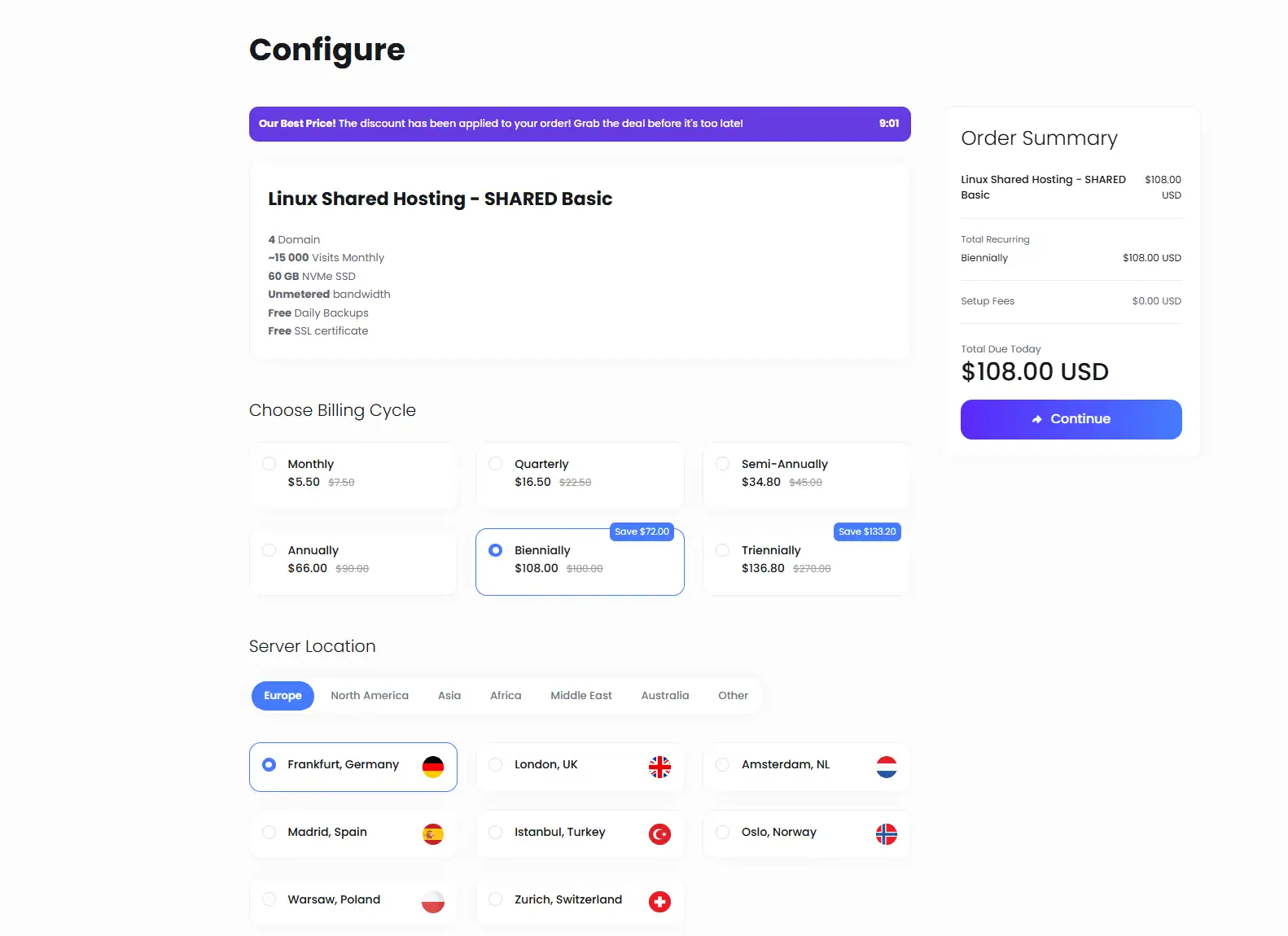
I started my testing by purchasing the Linux Shared Hosting – Basic plan, as I believe that’s the option most beginners and small businesses are likely to choose.
The checkout process was straightforward. After completing the payment, I received my account details within a few minutes, along with the information required to access the Ultahost Client Area.
The onboarding experience felt smooth. I’ve used hosting providers where you receive multiple emails containing scattered information, making it difficult to figure out where to start. Ultahost kept everything organized, allowing me to log in and begin exploring the platform almost immediately.
Although this might seem like a small detail, a simple onboarding experience creates a positive first impression, especially for users who are purchasing web hosting for the first time.
First Impression of the Client Area
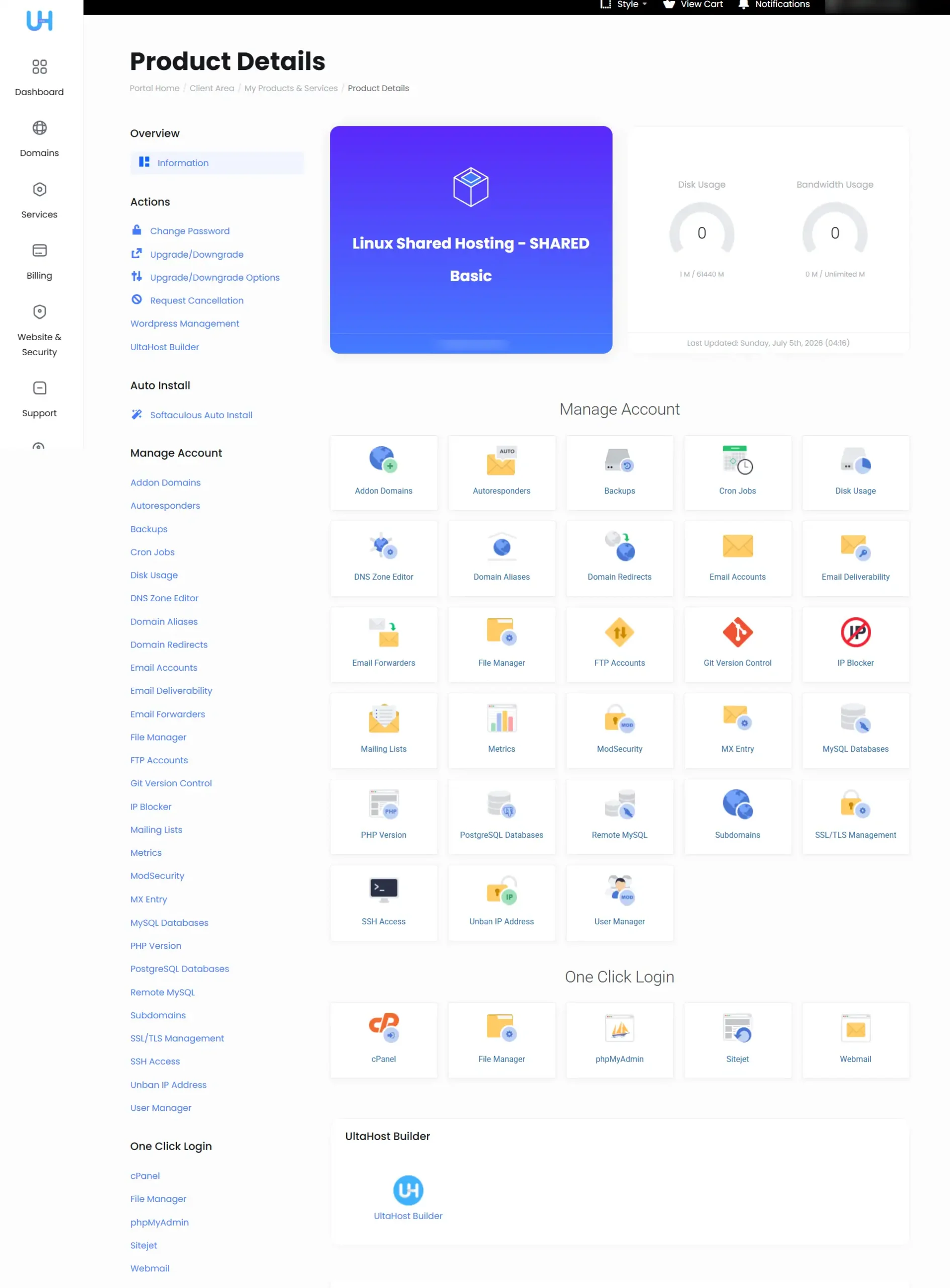
Once I logged into my account, I was taken to the Ultahost Client Area rather than cPanel.
Initially, I assumed this was Ultahost’s custom hosting control panel. After exploring the interface for a few minutes, I realised that the Client Area and cPanel serve different purposes.
The Client Area acts as the central hub for managing your hosting account. From here, I could access my hosting services, domains, SSL certificates, backups, support tickets, billing information, AI Website Builders, Auto Installer, email settings, and various website management tools.
I found the layout well organized, with most commonly used options easily accessible from the dashboard. Instead of navigating through multiple menus, I could quickly locate the tools I needed while setting up my website.
When it came to actual website administration, such as managing files, databases, email accounts, or server settings, Ultahost simply redirected me to cPanel.
Personally, I think this is a practical approach. Rather than replacing cPanel with a completely new interface, Ultahost uses the Client Area for account management while continuing to rely on the industry-standard cPanel for hosting administration. If you’ve used cPanel before, you’ll already feel familiar with the environment.
Testing the Ultahost AI Website Builder
Before installing WordPress, I wanted to test one of the features that attracted me to Ultahost in the first place—its AI Website Builder.
Interestingly, Ultahost offers two different AI website building options:
- Ultahost AI Builder
- Sitejet AI Builder
For this review, I decided to start with the Ultahost AI Builder to see how easy it would be for a beginner to create a website.
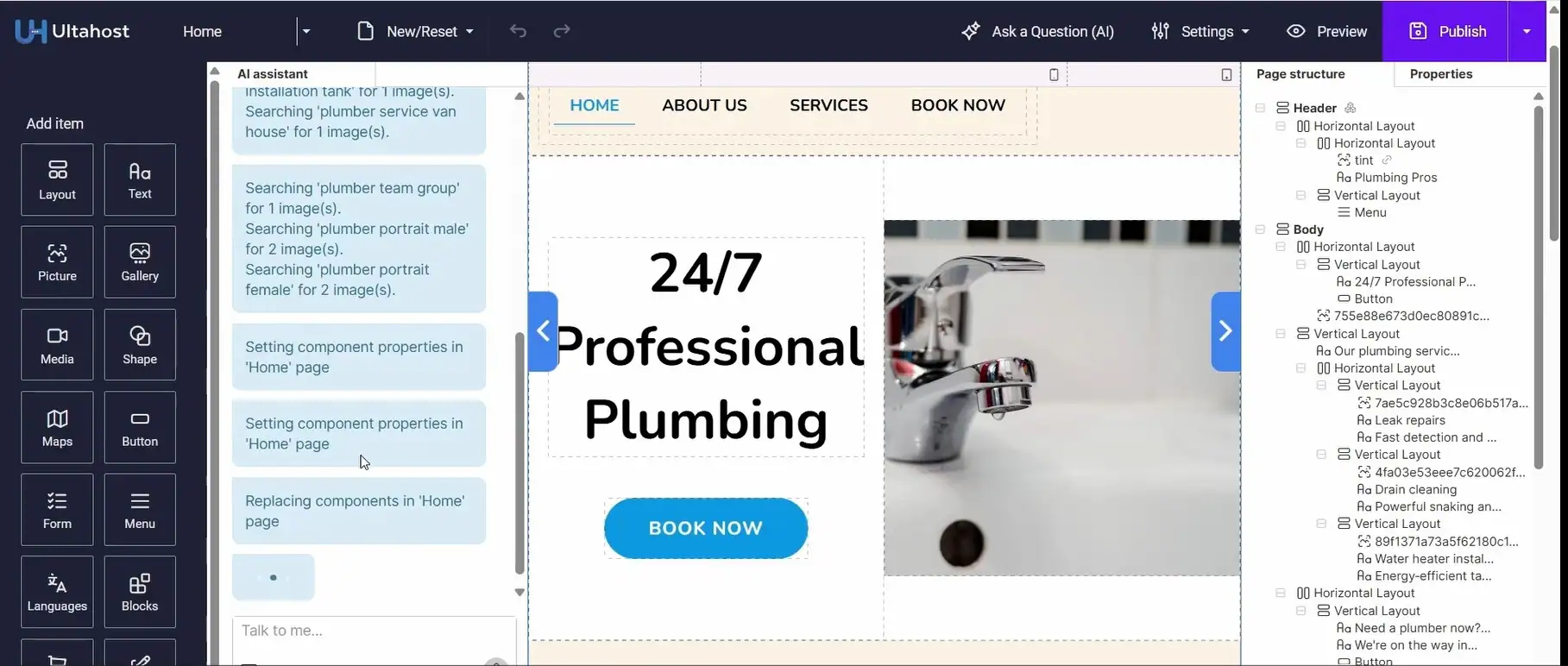
The setup process begins by asking a few simple questions about your business. I was asked to provide information such as the business name, industry, services, and the type of website I wanted to create.
For my testing, I chose to create a plumbing services website.
After submitting the information, the AI started generating the website automatically. Within a few minutes, it created a complete website that included a homepage, service sections, contact information, navigation menu, call-to-action buttons, and industry-related images.
I didn’t have to select a template or manually arrange page layouts. Instead, the AI generated a usable starting point that I could further customize.
What surprised me more is I expected the AI Builder to generate only a homepage. Instead, it created multiple pages, service sections, contact information, and navigation menus. That meant I spent less time on the initial setup than I expected. The generated website wasn’t perfect, and I wouldn’t recommend publishing it without making changes. However, it saved a considerable amount of time compared to starting with a blank page. Instead of thinking about page layouts and content structure, I could focus on refining what the AI had already created.
What I liked even more was that the AI remained available after the website was generated.
Unlike some AI builders that stop once the first draft is created, Ultahost allows you to continue working with the AI inside the editor. I could manually edit content, replace images, rearrange sections using drag-and-drop controls, or simply provide additional AI prompts to modify different parts of the website.
This combination of AI-assisted website generation and manual customization makes the builder suitable for beginners while still giving users enough flexibility to personalize the final result.
Understanding the Difference Between the Client Area and cPanel
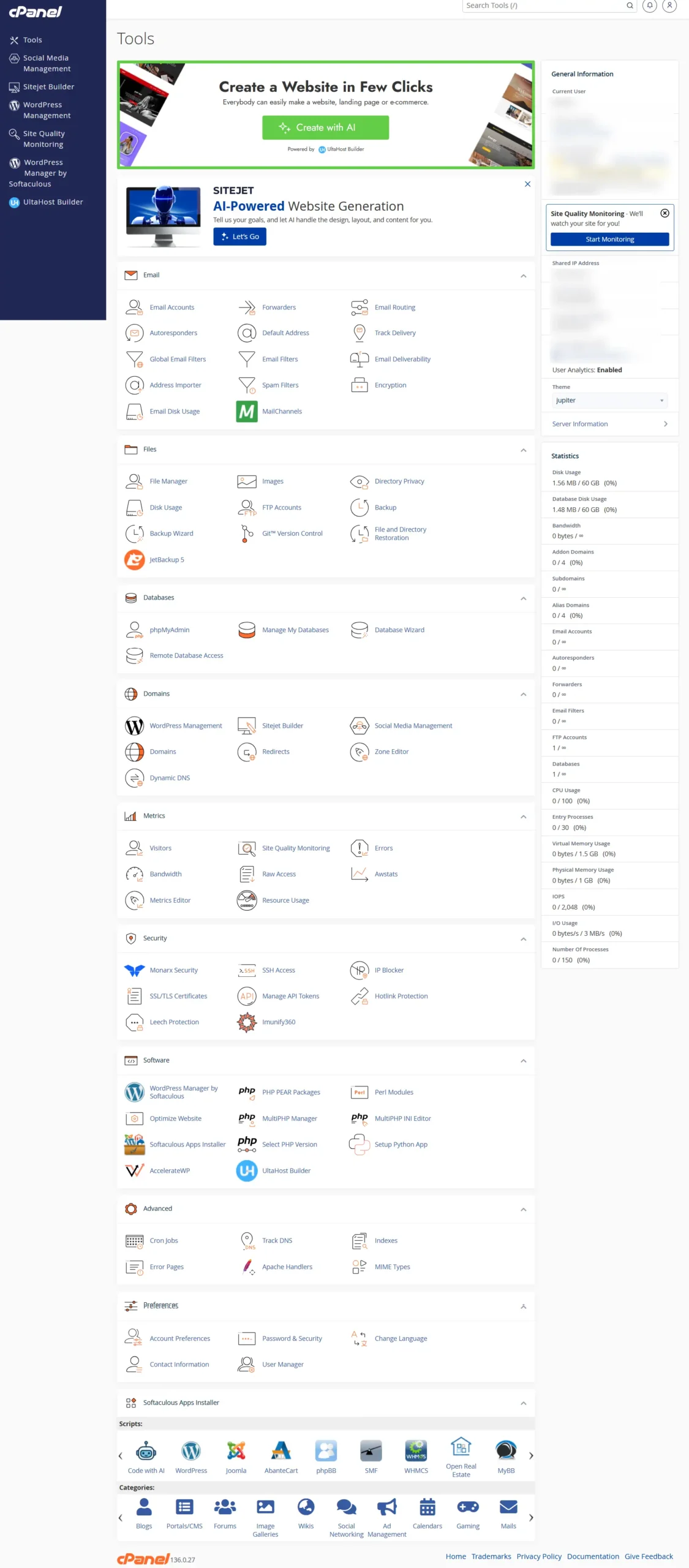
One thing that may confuse first-time users is the difference between the Ultahost Client Area and cPanel.
Initially, I thought the Client Area was replacing cPanel entirely. After spending some time with the platform, it became clear that both serve different purposes.
The Client Area is designed for managing your hosting account. This is where you can access your hosting plans, billing information, domains, backups, SSL certificates, support tickets, AI Website Builders, and various account-related settings.
Whenever deeper website management is required, Ultahost simply opens cPanel.
This includes tasks such as:
- File Management
- Database Management
- Email Accounts
- DNS Zone Editor
- Cron Jobs
- PHP Configuration
- Backup Management
- Metrics
Personally, I like this approach. Instead of replacing one of the industry’s most popular hosting control panels, Ultahost simply builds a cleaner customer dashboard around it.
If you’re already familiar with cPanel, you’ll feel comfortable almost immediately. If you’re new to hosting, you’ll only need to learn one industry-standard control panel instead of a completely proprietary system.
Features I Actually Used
Rather than repeating every feature listed on Ultahost’s website, I want to focus on the tools I actually used while setting up and testing my hosting account.
SSL Certificate
One of the first things I checked was SSL management.
Modern websites should always use HTTPS, not only for security but also because browsers now warn visitors when a website doesn’t have a valid SSL certificate.
I found SSL management directly inside the Client Area, making it easy to locate without searching through multiple menus. The process was straightforward and didn’t require any complicated manual configuration.
File Manager
I also explored the File Manager available through cPanel.
Although I normally manage WordPress websites directly from the WordPress dashboard, it’s always useful to have browser-based access to website files. Whether you need to edit a configuration file, upload custom scripts, or troubleshoot an issue, File Manager provides a convenient alternative to FTP software.
Since Ultahost uses the standard cPanel File Manager, everything worked exactly as expected.
PHP Version Management
Changing the PHP version is another task that website owners occasionally need to perform, especially when working with older themes or plugins.
Ultahost provides quick access to PHP version management through cPanel. During my testing, I verified that changing PHP versions is straightforward and doesn’t require command-line access or manual server configuration.
For beginners, this is much easier than dealing with server settings directly.
Email Hosting
Professional email addresses are still an important part of running a business website.
Instead of using a free Gmail address, you can create email accounts like:
Email account management is handled through cPanel, which again keeps the experience familiar for anyone who has used traditional hosting before.
Backup Management
Website backups are one of those features you don’t think about until something goes wrong.
During my testing, I noticed backup management was easily accessible from the Client Area. I always recommend maintaining your own independent backups as well, but it’s reassuring to know that backup options are integrated into the hosting dashboard rather than hidden away.
Customer Support Experience
Customer support is one of the areas where I prefer relying on my own experience rather than marketing claims.
Almost every hosting provider advertises 24/7 expert support, but the real question is how quickly they respond when you actually need help.
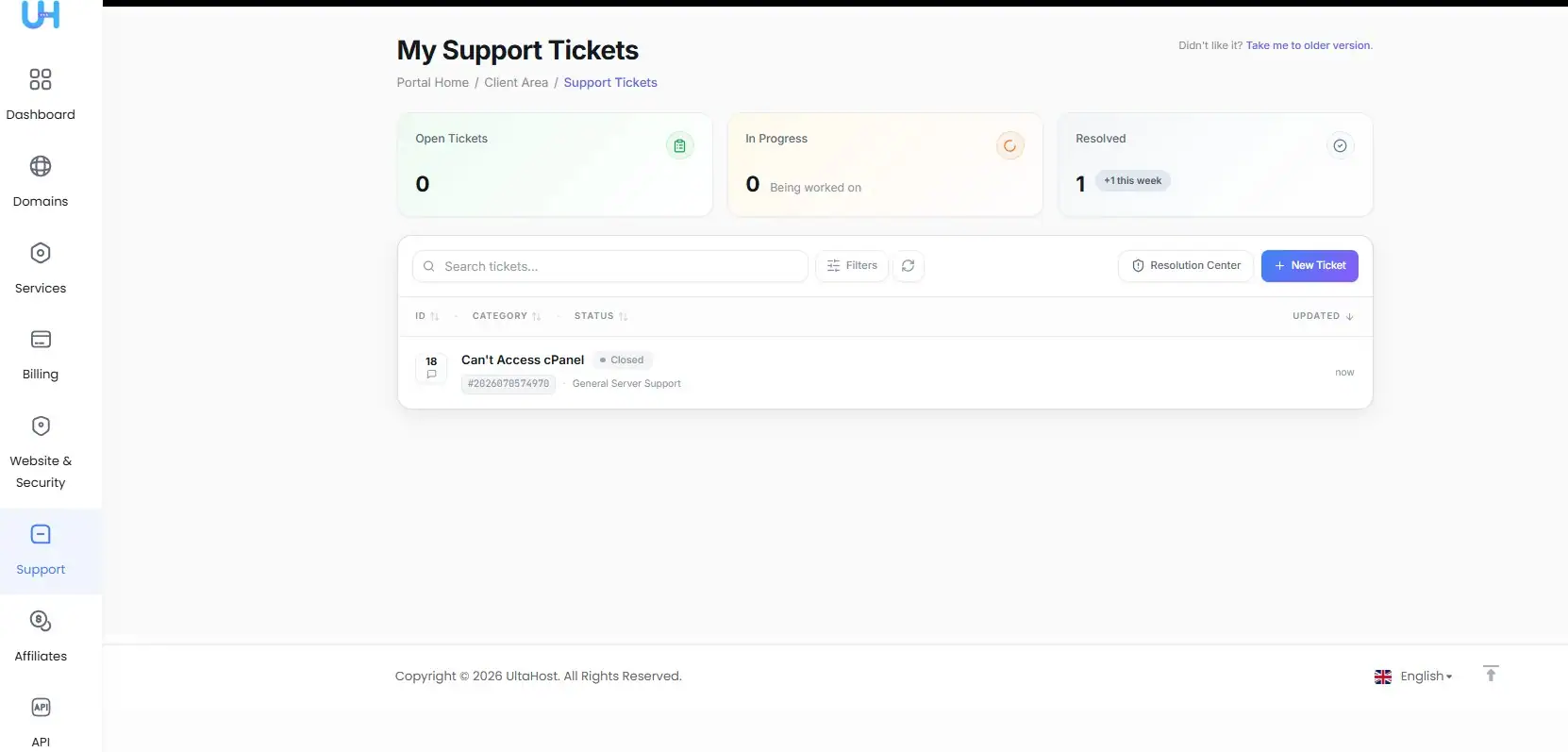
While exploring my hosting account, I encountered an issue accessing cPanel. Instead of trying to solve it on my own, I decided to raise a support ticket. It allowed me to evaluate the support team while also resolving the issue.
Submitting the ticket was straightforward. I described the problem and waited for a response.
To my surprise, I received the first reply in approximately five minutes.
The support representative acknowledged my issue, explained what was happening, and guided me towards a solution. My interaction was limited to this particular issue, so I can’t comment on every type of support request. However, my first experience with the support team was positive.
Another thing I liked was the ticketing system itself. It clearly shows the ticket status, response history, and updates, making it easy to track ongoing conversations without wondering whether your request has been seen.
I wouldn’t recommend choosing a hosting provider based solely on one support interaction, but based on my experience, Ultahost’s response time was impressive.
Performance and Infrastructure
Performance is probably the most overused term in the hosting industry. Every provider claims to be the fastest, but very few explain what actually contributes to good performance.
Rather than making claims I can’t verify, I’d prefer sharing what I observed during my testing and discussing the infrastructure Ultahost provides.
Throughout my testing, the platform felt responsive. Whether I was navigating the Client Area, generating a website using AI, installing WordPress, or working inside cPanel, everything worked smoothly without noticeable delays.
I didn’t perform long-term benchmark testing or monitor uptime for several months, so I won’t claim that Ultahost is the fastest hosting provider. Those types of tests require dedicated monitoring tools and extended observation.
However, from an infrastructure perspective, Ultahost appears to have invested in modern hardware. The company uses NVMe SSD storage, Intel Xeon processors, DDR5 RAM, and follows a Never Oversold resource allocation policy.
The “Never Oversold” policy is particularly interesting. In simple terms, it means the company aims to avoid placing too many hosting accounts on the same server. While I can’t independently verify this claim, it’s a positive approach because excessive overselling can affect website performance on shared hosting.
Global Data Centers
One feature that deserves special mention is Ultahost’s global data center network.
At the time of writing this review, Ultahost offers 27+ data center locations across North America, Europe, Asia, Australia, South America, Africa, and the Middle East.

Some of the available locations include:
- Mumbai (India)
- London (United Kingdom)
- Amsterdam (Netherlands)
- Frankfurt (Germany)
- Madrid (Spain)
- Dubai (UAE)
- Tokyo (Japan)
- Singapore
- Sydney (Australia)
- Toronto (Canada)
- Chicago, Dallas, Seattle, Los Angeles, and New York (USA)
- São Paulo (Brazil)
- Johannesburg (South Africa)
- Seoul (South Korea)
- Hong Kong
- Zürich (Switzerland)
- Oslo (Norway)
- Warsaw (Poland)
- Helsinki (Finland)
For Indian users, I would recommend selecting the Mumbai data center during the order process whenever possible. Hosting your website closer to your target audience can help reduce latency and improve page loading times.
Similarly, if your visitors are primarily based in Europe or North America, choosing a nearby server location makes much more sense than hosting the website on another continent.
Many beginners overlook this option, but selecting the right data center is one of the easiest ways to optimize your website before you even install WordPress.
Pricing and Value for Money
Pricing is often one of the biggest deciding factors when choosing a hosting provider. However, I believe the renewal price is just as important as the introductory price because that’s what you’ll continue paying after your initial subscription ends.
One thing that immediately stood out while reviewing Ultahost was its transparent pricing policy. Unlike many popular hosting providers that offer deep introductory discounts followed by significantly higher renewal prices, Ultahost follows a different approach.
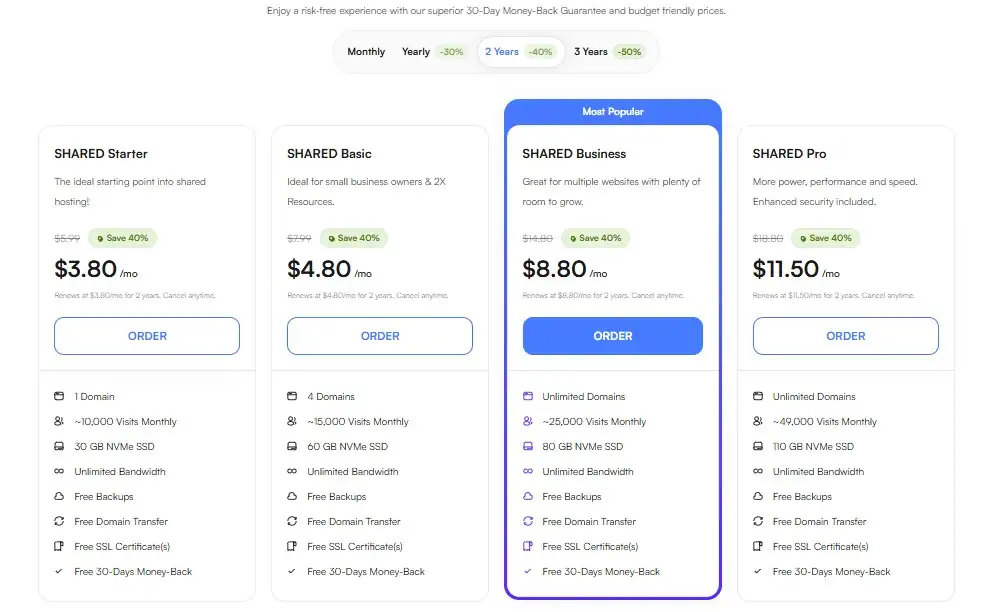
At the time of writing this review, the renewal price for its shared hosting plans remains the same as the price you initially sign up for (based on your selected billing cycle). For example, if you purchase the Basic Shared Hosting plan at $4.80/month for a 24-month term, you’ll renew at the same monthly price instead of seeing your hosting bill suddenly double or triple.
As someone who has reviewed multiple hosting providers over the years, I genuinely appreciate this pricing model. Predictable renewal pricing makes budgeting much easier, especially for bloggers, freelancers, and small business owners who plan to keep their websites online for several years.
Apart from the Basic plan, Ultahost also offers Business, Professional, and Enterprise shared hosting plans. The higher-tier plans include additional resources, allowing users to upgrade as their websites grow without changing hosting providers.
What I Liked About Ultahost
After spending time with the platform, there were several things that genuinely stood out during my testing.
1. Two AI Website Builders Instead of One
Most hosting providers either offer WordPress or a basic website builder. Ultahost takes a different approach by providing two AI-powered website builders—Ultahost AI Builder and Sitejet AI Builder.
I tested the Ultahost AI Builder and found it surprisingly useful for quickly generating a business website. More importantly, the AI remains available even after the website is generated, allowing you to continue refining the design using additional prompts or manual editing.
For beginners who have never built a website before, this significantly reduces the learning curve.
2. Flexibility to Use WordPress
Although I enjoyed testing the AI Website Builder, I also liked the fact that Ultahost doesn’t force users into its own ecosystem.
Installing WordPress took only a few minutes, and once it was ready, I had complete freedom to customize the website using themes, plugins, and the WordPress dashboard.
Whether you prefer AI-generated websites or traditional WordPress development, Ultahost supports both approaches equally well.
3. Familiar cPanel Environment
Some hosting companies replace cPanel with their own custom dashboards. While there’s nothing wrong with custom control panels, they usually require some learning.
Ultahost takes a more practical approach by using its Client Area for account management while leaving website administration to the familiar cPanel interface.
Since cPanel has been an industry standard for years, I was able to find everything without any confusion.
4. Transparent Renewal Pricing
This deserves another mention because it’s something I don’t often see in the hosting industry.
Many hosting providers advertise attractive introductory prices, only to recover those discounts through higher renewal costs. Ultahost’s pricing structure is much easier to understand because the renewal price remains the same as the purchase price for the selected term.
For anyone planning to keep their website online for the long run, this can make a noticeable difference to the total cost of ownership.
5. Responsive Customer Support
The support ticket I raised during testing gave me a positive first impression of Ultahost’s support team.
Receiving a response in around five minutes was quicker than I expected. While every support request is different and response times can vary depending on the issue, my experience suggests that the support team is responsive and willing to help.
6. Wide Choice of Data Centers
Having more than 27 global data centers gives users the flexibility to host their websites closer to their target audience.
For Indian users, the Mumbai data center is a welcome addition. Likewise, users targeting customers in Europe, North America, Australia, or other regions have multiple location choices available.
Where Ultahost Can Improve
No hosting provider is perfect, and Ultahost is no exception. While my overall experience was positive, there are a few areas where I think the platform could improve.
AI Content Still Needs Editing
The AI Website Builder does an impressive job of creating a complete website, but I wouldn’t recommend publishing the generated content without reviewing it first.
Like most AI tools available today, the generated text should be treated as a starting point rather than the finished product. I still spent some time updating the content, replacing images, and making the website feel more personal.
A Smaller Brand Compared to Established Competitors
Ultahost has grown rapidly, but it’s still a relatively new company compared to hosting providers like Hostinger, Bluehost, or SiteGround.
That doesn’t necessarily mean it’s a worse hosting provider. In fact, many aspects of the platform felt more modern than some older competitors. However, long-term reputation is something that naturally develops over time.
More Tutorials Would Help Beginners
Although I didn’t face any major difficulties during setup, beginners often rely on detailed documentation and video tutorials.
Expanding the knowledge base with more beginner-friendly guides would make the platform even easier for first-time users.
Ultahost vs Hostinger
Since I’ve also reviewed Hostinger, it’s only fair to compare the two based on my own experience.
| Feature | Ultahost | Hostinger |
|---|---|---|
| AI Website Builder | ✅ Ultahost AI + Sitejet AI | ✅ AI Website Builder |
| WordPress Installation | Excellent | Excellent |
| Control Panel | Client Area + cPanel | Custom hPanel |
| Renewal Pricing | Same as Purchase Price | Higher than introductory pricing |
| Indian Data Center | Mumbai | Mumbai |
| Beginner Friendliness | ⭐⭐⭐⭐☆ | ⭐⭐⭐⭐⭐ |
| Flexibility | ⭐⭐⭐⭐⭐ | ⭐⭐⭐⭐☆ |
Hostinger remains one of my favourite hosting providers because of its polished ecosystem, excellent documentation, and beginner-friendly hPanel.
Ultahost, however, offers a few advantages that make it stand out. I particularly like its transparent renewal pricing, the availability of two AI Website Builders, and the decision to continue supporting cPanel alongside its Client Area.
Rather than saying one provider is universally better than the other, I’d suggest choosing based on your requirements. If you’re already comfortable with cPanel or want predictable long-term pricing, Ultahost is certainly worth considering. If you prefer a more mature ecosystem with extensive tutorials, Hostinger still remains an excellent choice.
Who Should Buy Ultahost?
Based on my experience, I think Ultahost is best suited for:
- Beginners who want to create their first website using AI or WordPress.
- Small business owners looking for an affordable hosting provider with professional email, SSL, and modern website creation tools.
- Bloggers who prefer WordPress but also appreciate having AI tools available.
- Freelancers and agencies that manage multiple websites and prefer working with cPanel.
- Website owners looking for predictable long-term hosting costs without worrying about renewal price increases.
If your website requires enterprise-level infrastructure or highly specialized server configurations, you may want to explore VPS or Dedicated Hosting plans instead of shared hosting.
My Final Verdict
After purchasing an Ultahost hosting plan, building a website using the AI Website Builder, installing WordPress, exploring the Client Area and cPanel, and interacting with customer support, I came away with a positive impression of the platform.
What impressed me the most wasn’t a single feature but the overall flexibility. Ultahost gives you multiple ways to build a website, whether you prefer AI-powered website creation or the complete flexibility of WordPress. It also combines a modern Client Area with the familiarity of cPanel, making the transition easier for existing hosting users.
I also appreciate the company’s approach to pricing. Transparent renewal costs are still relatively uncommon in the hosting industry, and I hope Ultahost continues following this pricing model as it grows.
Of course, the company is still building its reputation, and I’d like to see its documentation become even more comprehensive over time. However, based on my own hands-on experience, I found the platform easy to use, well organized, and suitable for both beginners and experienced users.
If you decide to purchase Ultahost, don’t forget to check CouponSathi first. We regularly update the latest Ultahost coupon codes, exclusive deals, and promotional offers, helping you get the best possible price on your hosting purchase.
Frequently Asked Questions
Is Ultahost good for beginners?
Yes. Beginners can either build a website using the AI Website Builder or install WordPress using the Auto Installer. Both options are straightforward and don’t require technical knowledge.
Does Ultahost use cPanel?
Yes. Ultahost uses its own Client Area for account management while relying on cPanel for website administration.
Can I create a website without WordPress?
Absolutely. During my testing, I created a complete plumbing business website using the Ultahost AI Website Builder without installing WordPress. Ultahost also offers the Sitejet AI Builder as an alternative.
How was your customer support experience?
I raised a support ticket while testing the platform and received my first response in approximately five minutes. While this was only one interaction, the response was prompt, helpful, and professional.
Does Ultahost increase renewal prices?
At the time of writing this review, no. Ultahost’s shared hosting plans renew at the same price as the original purchase price for the selected billing cycle, making its pricing much more transparent than many competing hosting providers.


